Kathana Mail System (Phase-1)
Explains the newly added Mail System that replaces the legacy version, and shows where players collect their rewards. The attached image covers the basic Phase-1 steps.
@role recently we have added this new feature of Mail System that tops 100% better than the other legacy version. But since its new, many players doesn't know about it and does not know where to receive the rewards! Here's the basic guide for the Mail System (Phase-1)
Screenshots
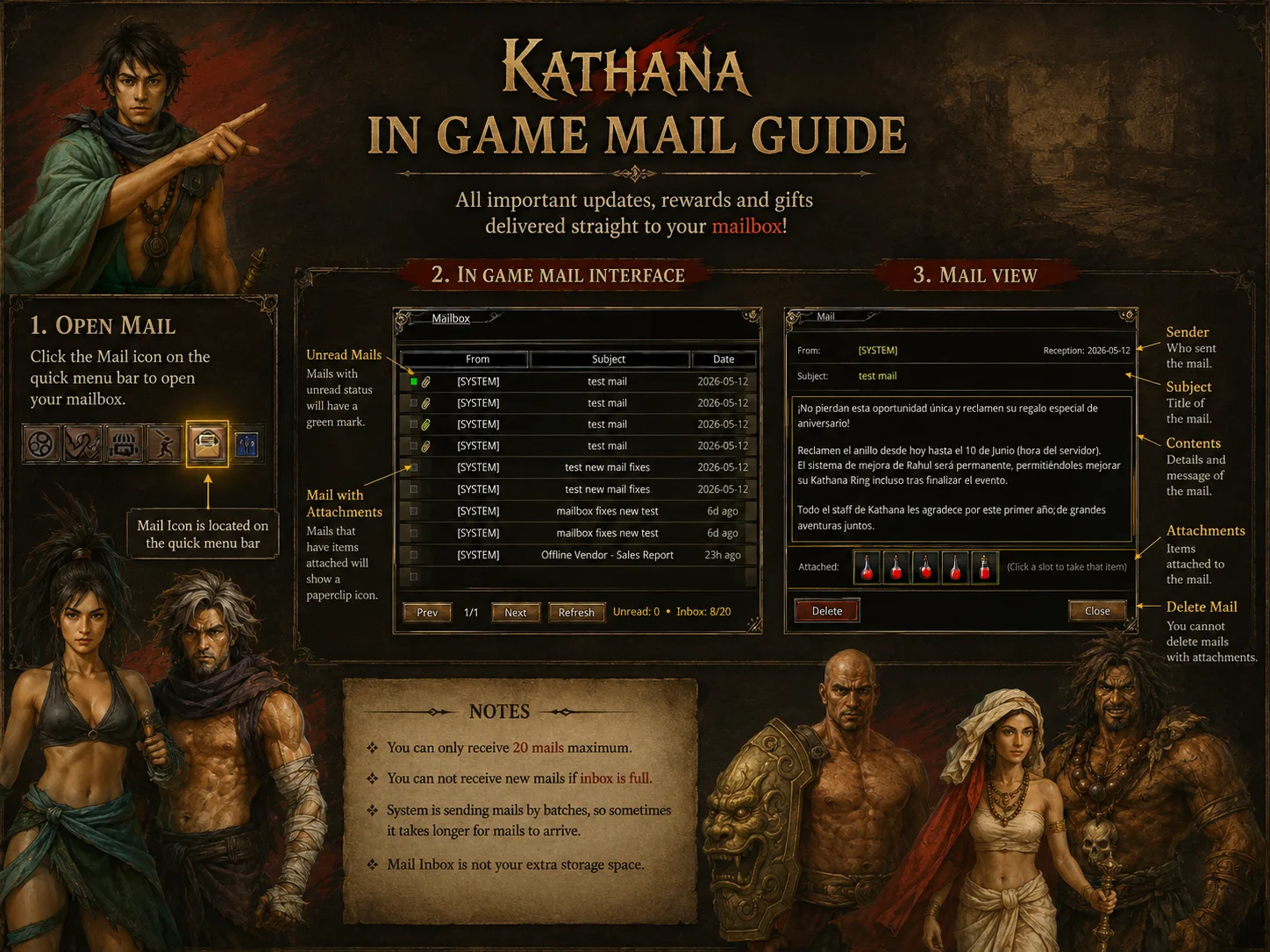
What this shows
KATHANA IN GAME MAIL GUIDE
All important updates, rewards and gifts delivered straight to your mailbox!
1. OPEN MAIL
Click the Mail icon on the quick menu bar to open your mailbox.
Mail Icon is located on the quick menu bar
2. IN GAME MAIL INTERFACE
Mailbox
Unread Mails - Mails with unread status will have a green mark.
Mail with Attachments - Mails that have items attached will show a paperclip icon.
| From | Subject | Date |
|---|---|---|
| [SYSTEM] | test mail | 2026-05-12 |
| [SYSTEM] | test mail | 2026-05-12 |
| [SYSTEM] | test mail | 2026-05-12 |
| [SYSTEM] | test mail | 2026-05-12 |
| [SYSTEM] | test new mail fixes | 2026-05-12 |
| [SYSTEM] | mailbox fixes new test | 6d ago |
| [SYSTEM] | mailbox fixes new test | 6d ago |
| [SYSTEM] | Offline Vendor - Sales Report | 23h ago |
Prev 1/1 Next Refresh Unread: 0 Inbox: 8/20
3. MAIL VIEW
Sender - Who sent the mail.
Subject - Title of the mail.
Contents - Details and message of the mail.
Attachments - Items attached to the mail. [Click a slot to take that item]
Delete Mail - You cannot delete mails with attachments.
From: [SYSTEM] Reception: 2026-05-12 Subject: test mail
[No pierdan esta oportunidad única y reclamen su regalo especial de aniversario!
Reclamen el anillo desde hoy hasta el 10 de junio (hora del servidor). El sistema de mejora de Rahul será permanente, permitiendo mejorar su Kathana Ring incluso tras finalizar el evento.
Todo el staff de Kathana les agradece por este primer año de grandes aventuras juntos.]
Attached: [5 red potion icons] [Click a slot to take that item]
Delete Close
NOTES
-
You can only receive 20 mails maximum.
-
You can not receive new mails if inbox is full.
-
System is sending mails by batches, so sometimes it takes longer for mails to arrive.
-
Mail Inbox is not your extra storage space.
From the replies
- jarette19 May 2026+1
You can also use command
$mail